|
Optimizing processes used by Land Surveyors and Civil Engineers since 1989.
CE Provider#0003971 (Engineers)
CE Provider#0001372 (Surveyors and Mappers)
|
Civil 3D Webcasts
Links from Autodesk.com
Survey Topics
Make this your first stop on the road to becoming a skilled Civil 3D user. First discover the features built into the product by viewing the webcasts. Some of this you can learn on your own. Then get training to help you accelerate that learning experience and pick up a few more useful tricks along the way.
- Survey Features in C3D
- Parcels
- Survey Data
-
Note: Survey Points are not COGO Points
-
3 external databases
-
Equipment Database
-
Figure Prefix Database
-
Survey Database - external .sdb file
-
Survey Database settings (extended properties is going to be huge benefits once discovered by the gis world)
-
Survey Networks - styled, browsed, edited, updated
-
Survey command line - manual data entry demo
-
Did not get to these topics in this webcast
-
Automatic Linework
-
Fig Prefix - Breakline, Lot Line, Layer, Style - only applied at time of creation
-
Desc Keys vs Point Groups
-
Translate Rotate
-
Zone Transformation - assumed to SPC
-
SP2 fixes - Survey Link 7.5.5 added - subscription only - manually add to menu
-
Survey Extension for C3D 2008 - only on the subscription web site
- COGO Features
- Survey Enhancements in 2008
- Translate-Rotate
- Transform between coord systems
- Grid to Ground conversion
- Extended Properties on Figures and Points
- Settings stored in files for Equipment, Database, Extended Props, User Settings
- Line/Curve commands just like LDT
- Survey Point Groups > C3D Point Group by Drag/Drop
- Drag and drop Survey points > Survey Point Group
- Unlock points in the drawing for editing
- Extended Properties - 2 ways: LandXML (v1.1only) or User - sdx_def file
- Example - Manhole data collected in field. Setup a point label style to display Extended Props
- Export Points and include Extended Properties
- Import Survey LandXML - Parcel data, extended data, points
- Rob Todd utilities for Translating Survey Network - move and rotate from Assumed to Grid using a wizard
- Transform between Grid and Ground
- Example: Extract FDO geometry and push to drawing database - bring into assumed coord drawing
- Introduction to C3D 2008
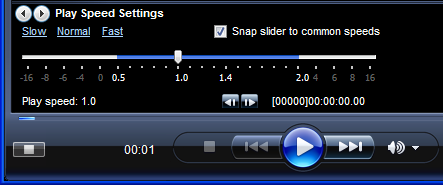
Save time. Speed up the playback by changing your Windows Media Player settings.
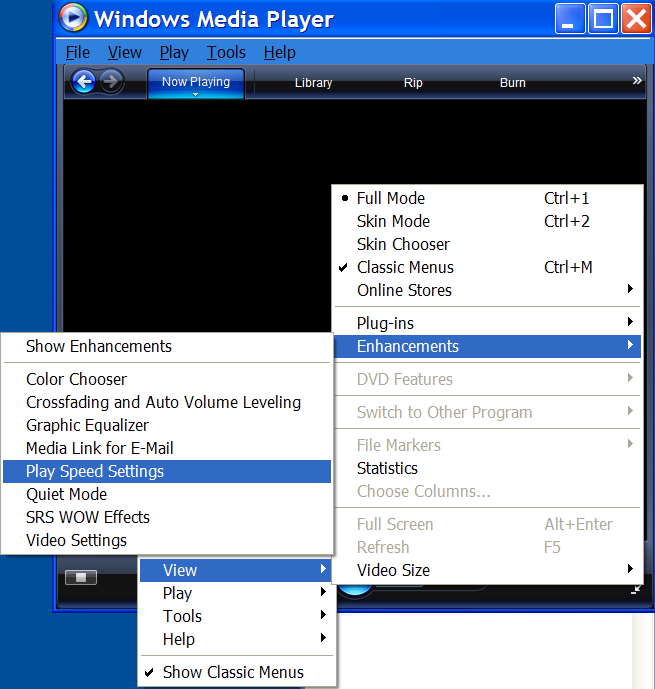
Right click > View > Enhancements > Play Speed Settings
Copyright © 2007-2008 Advanced Surveying Technology. All rights reserved.


